

Are you looking for a WordPress booking plugin with payment functions? This article compares the most popular WordPress booking solutions that can transform your booking process - allowing customers to easily book and pay for services and helping you maintain control over your booking management.
Comparison of Popular WordPress Appointment Booking Plugins
There are many WordPress scheduling plugins on the market. Still, many come with limitations like complicated interfaces, a lack of customization for booking forms, or a lengthy customization process for your business. These issues can disrupt your appointment booking process, cause double bookings, or result in missed opportunities for online appointment bookings.
We have compared three of the most popular WordPress booking plugins with payment functions in the table below.
Pembee: The Perfect Solution for WordPress Users Looking For Payment Options
| Category | Pembee | Amelia | BookingPress |
|---|---|---|---|
| Best For | Businesses that organize classes, courses, workshops, clubs or camps, looking for an out-of-box but customizable booking management solution. | Businesses seeking versatile booking tools for appointments and events, but with a willingness to invest time in setup and customization. | Beginners or small businesses needing an intuitive, straightforward booking system with basic features. |
| Ease of Use | Highly user-friendly with an intuitive admin panel for end-to-end booking management. | Rich features and flexibility, but setup is time-consuming and advanced customization requires expertise. | Beginner-friendly and reliable, but limited customization and occasional technical issues reported. |
| Customization Options | Fully customizable booking forms with custom fields. | Moderate customization; predefined booking flows with limited flexibility. | Good customization for booking forms, but lacks advanced custom fields. |
| Payment Options Supported | Supports card payment, Apple Pay, Google Pay, Klarna via its Stripe integration. Also supports offline payments. | Supports popular gateways and onsite payment. | Supports popular gateways and onsite payment. |
| Capterra Review | 4.9/5.0 | 4.9/5.0 | 4.5/5.0 |
| Pros |
- User-friendly interface and booking flow - Customizable booking forms - Excellent customer support |
- Simple appointment booking - Supports multiple payment gateways - Suitable for advanced users |
- Beginner-friendly - Simple setup process - Affordable for small businesses |
| Cons |
- Some features still being developed like gift cards - Less suited for one-on-one appointments |
- Setup can be time-consuming - Advanced customization requires expertise - Higher learning curve |
- Lacks advanced customization features - Limited support for large businesses - Some reported technical issues |
Pembee is an intuitive appointment booking plugin designed for seamless booking management and online scheduling. By integrating Pembee with your WordPress website, you can upgrade your WordPress site to be an online booking system for your classes and courses. With a user-friendly admin dashboard and customer booking flow, your customers can easily book classes, pay using their preferred payment method, and receive email notifications for confirmation.
How to Integrate Pembee with WordPress
Pembee’s integration with WordPress is a breeze. There are several options to integrate the booking system Pembee with WordPress.
Using the iFrame Embed Option to Embed a Booking Widget
An iFrame allows you to embed external web content within your website. To integrate Pembee using iFrame:
- Log into your Pembee account and navigate to Admin/Settings/Share-site section.
- Copy the provided iFrame code, make necessary changes to parameters such as height and width, and pre-set any filters you wish to use.
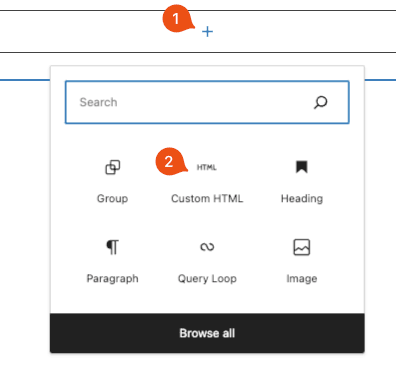
- In your WordPress dashboard, open the page or post where you want to display the booking system, click on the ‘+' sign, and choose ‘Custom HTML'.
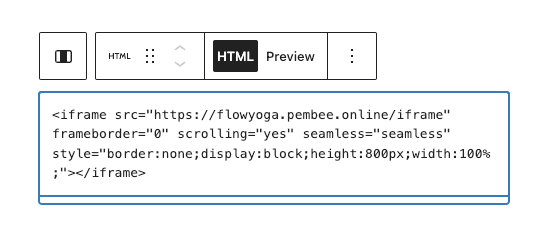
- Paste the iFrame code and click Preview.
- If you are happy with the preview, save or publish your changes.
For a seamless look, adjust the width and height parameters in the iFrame code or style it using CSS.
Using the Call-Out Button Option
A call-out button serves as a clear call-to-action, guiding visitors towards making a booking.
- Log into your Pembee account and navigate to Admin/Settings/Share-site section.
- Copy the provided button code, making necessary changes to parameters such as text and size
- Paste the code into your WordPress page or widget area where you want the button to appear.
Make sure the button is positioned prominently, ensuring easy accessibility for visitors.
Create a Website Link
You can also create your own button style in Wordpress, and simply link the button to the Pembee site.
Key Features of Pembee
Here’s what makes Pembee the perfect solution for your WordPress booking engine:
- Customizable Booking Form Template: Design tailored forms for appointments that suit your business needs. Add custom fields to capture specific details about bookings.
- Online Payments and Payment Management: Simplify your booking process with a secure online payment gateway, Stripe, that handles everything from credit cards, Apple Pay, Google Pay to Klarna. Track payment details effortlessly from the admin panel. Pembee is fully integrated with Stripe so you can handle booking cancellations and refunds all within our single platform.
- Flexible Payment Methods: Pembee also supports offline payments like Direct Bank Transfer, ensuring flexibility for customers.
- Advanced Marketing Features: Easily set up discount coupons, class passes, and abandoned cart recovery emails.
- Effortless Admin Management: Save time spent on admin with a booking calendar view, self-service client booking cancellation options with your own booking cancellation rules, live class rosters, and live attendance tracker.
Pembee is the perfect solution for businesses looking for a reliable, easy-to-use booking engine with integrated online payments. Its advanced features, such as customizable booking forms and robust payment systems, make it an excellent alternative to traditional appointment booking plugins.
Ready to streamline your class booking process? Try Pembee today with a 30-day free trial and experience a hassle-free online appointment scheduling solution.
FAQs
- Does WordPress have a built-in booking system?
- WordPress doesn't include a native booking system, but it supports a wide range of booking plugins and third-party integrations. You can add booking functionality to any WordPress site using a plugin from the WordPress repository, or by embedding an external booking platform like Pembee via iframe or a call-to-action button. The iframe approach in particular gives you full booking and payment functionality without the maintenance overhead of a WordPress plugin.
- Does WordPress support online payment processing for bookings?
- WordPress doesn't have built-in payment processing, but it connects easily with payment gateways through plugins and third-party tools. Pembee handles payments natively via Stripe, supporting credit and debit cards, Apple Pay, Google Pay, Klarna, and offline methods like bank transfers — all managed from a single dashboard. When you embed Pembee into your WordPress site, payment collection is handled entirely within Pembee, with no need for WooCommerce or a separate payment plugin.
- How do I add a booking system with payments to my WordPress website?
- The quickest way is to embed a third-party booking platform like Pembee using an iframe. Log into Pembee, copy the iframe code from your account settings, then paste it into a Custom HTML block on any WordPress page. The full booking and payment flow — including Stripe checkout, confirmations, and reminders — runs inside the embed. Alternatively, Pembee provides a call-out button code you can drop onto any page as a booking CTA. Most users are live and taking bookings within a few hours.
- What is the best WordPress booking plugin with payment for classes and camps?
- For activity-based businesses running classes, camps, workshops, or after-school programmes, Pembee is the strongest option. Unlike general WordPress appointment plugins, Pembee is purpose-built for group bookings, multi-session courses, and family registrations. It handles session passes, sibling discounts, waitlists, attendance tracking, and payment plans — all features that generic plugins like Amelia or BookingPress don't cover well. It integrates with WordPress via iframe in minutes, with no plugin installation or maintenance required.
- What's the difference between a WordPress booking plugin and an iframe integration?
- A WordPress booking plugin is installed directly into your WordPress dashboard and runs on your own server. An iframe integration embeds an external platform (like Pembee) inside your WordPress page using a short code snippet. The iframe approach typically offers more advanced features, more reliable updates, and better payment security — since the booking and payment infrastructure is maintained by the provider, not your hosting environment. It also means you're not dependent on plugin compatibility with your WordPress theme or version.
- How much does a WordPress booking plugin with payment cost?
- Costs vary widely. Free plugins like BookingPress cover basic scheduling but charge for payment add-ons. Amelia starts at around $49/year for a single site licence, but advanced features like recurring bookings require higher tiers. Pembee uses a monthly subscription model starting at $45/month, which includes full payment processing via Stripe (at 0.59% + standard Stripe rates), automated reminders, custom booking forms, and customer support — with a 30-day free trial and no credit card required to get started.
- Do WordPress booking plugins work on mobile devices?
- Most modern WordPress booking plugins and embedded booking systems are mobile-responsive, meaning they adapt to any screen size. Pembee's booking flow is fully optimised for mobile, so customers can browse available sessions, register, and pay from a smartphone without any friction. This matters because a significant share of bookings — particularly for children's activities and classes — happen on mobile, often while parents are on the go. Always test your booking flow on a phone before going live.